Processor
Processor (or CPU ⇐> Central Processing Unit):
- Executes software ⇒ receives their instructions
Machine Language
Hardware does not speak C, Java or other programming languages ⇐> 0 and 1s
It is the lowest level of programming language
High level code into binary:
- We have the source code
- The source code gets compiled or interpreted
- Compiler: translates the code into intermediate formats
- Interpreter: executes the source code line by line → translation in real time
- We link the code ⇒ combine intermediate formats with libraries and functions
- (Optional) Generation of Assembly (human readable machine code)
- Binary code generation
Let’s translate a simple program that counts the amount of ones within a variable:
int data = 0x00123456;
int result = 0;
int count = 0;
int temp = 0;
int mask = 1;
int limit = 32;
do {
	temp = data & mask;
	result = result + temp;
	data = data >> 1;
	count = count + 1;
} while (count != limit);
Let’s follow a simple recipe:
- We add lines numbers and labels to some lines
- Assign variables to registers in memory
- Replace each line with its corresponding machine code instruction
/* 0:*/int x1 = 0x00123456;
/* 1:*/int x2 = 0;
/* 2:*/int x3 = 0;
/* 3:*/int x4 = 0;
/* 4:*/int x5 = 1;
/* 5:*/int x6 = 32;
/* 6:*/do {
/* 7:*/	 x4 = x1 & x5; // labeled as loop
/* 8:*/	 x2 = x2 + x4;
/* 9:*/	 x1 = x1 >> 1;
/*10:*/	 x3 = x3 + 1;
/*11:*/} while (x3 != x6);
Here are some assembly instructions we will use:
| Assembly | Description |
|---|---|
li | load a literal into a variable |
and | bitwise and |
add | addition of variables |
addi | addition with a literal |
srli | shift right logical by a literal |
bne | Branch (go to line with label) if two variables are not equal |
li x1, 0x00123456
li x2, 0
li x3, 0
li x4, 0
li x5, 1
li x6, 32

loop: and  x4, x1, x5
      add  x2, x2, x4
      srli x1, x1, 1
      addi x3, x3, 1
      bne  x3, x6, loop
There are two parts to a processor:
- Data path (variable operations, etc…)
- Control path (instruction reading)
Data Path
For a datapath, we have
- An ALU (arithmetic-logic unit)
- Performs the logic operations on the variables
- A register file
- Array of registers for keeping the variables and other uses
- Two registers can be read in the same clock cycle
- On small CPUs, we have FF (which is expensive per bit)
We typically have a register file connected directly to an ALU:
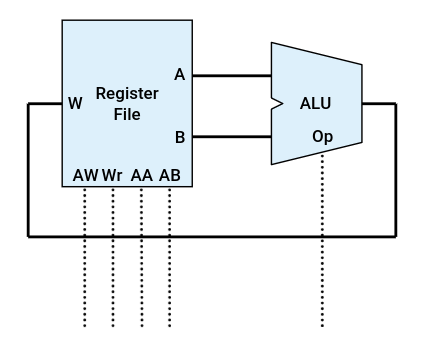
Because they are so close to each other, data transfer is really fast
Control Path
The control logic of the processor ⇒ read, sequence and decode instructions.
Essentially a FSM.
We have instruction memory (NOT A REGISTER FILE)
The CPU has an additional register to keep track of our progress in the program: PC (Program Counter) — typically incremented by one after each instruction
Sometimes (following a branch/jump statement) we might need to not increment the PC, but set it to a new value. ⇒ the program counter need to be able to be updated by the logic
Storage
In practice, the register file is not big enough to hold all the data
Therefore we also usually have a memory for holding data that is not needed as often.
⇒ This memory is slower but bigger than the register file
Types of Computer Architecture
- Harvard
- Instructions and data are in separate memory
- Found in smaller systems
- Von Neumann
- Instructions and data are in the same memory
- Common in general purpose computers (like this one :)
Instruction Set Architecture
⇒ Aka ISA ⇒ Refers to the set of instructions that a CPU can execute and the programming model that these define for software
This way programmers (us) can use CPU features without worrying about how they are specifically implemented in the hardware.
ISA details typically have:
- An instruction set (which the CPU can execute)
- Encoding (the binary equivalent to each instruction)
- Register (where the processor can store results and operands)
- Data types and formats (which are supported)
- Memory addressing modes (how to access operands from memory)
We have RISC and CISC ⇒ Reduced/Complex Instruction Set Computers
Modular and Incremental ISA
Modular ⇒ Optional extensions that hardware can support
Incremental ⇒ new hardware must implement old ISAs and all extensions
- This makes the instruction set grow exponentially
In this class we will study mostly the RV32I instruction set:
- RV: RISC-V
- 32: 32-bit
- I: integer operations
For the final exam we will have a reference card — which covers a lot of the technical details